
Hey, team!
Unfortunately, it’s been some time since I’ve been able to post something but recently, I ran into an issue with a customer’s VMware VCF 5.1.0.0 environment. The cause was a known issue listed in the VMware Cloud Foundation 5.1 Release Notes (see ‘When networkProfileName is empty string, Add Host fails’), but the fix wasn’t really documented internally or publicly other “don’t leave it blank”. So what value are you supposed to provide here? Since there wasn’t any official documentation, I started digging because we were at the point where we needed to re-commission and re-provision a rebuilt host to a particular VI domain with a multi-NIC, multi-VDS configuration.
We successfully commissioned the host into the SDDC Manager, but provisioning it to cluster in the appropriate VI Domain was failing on the ‘Create or update NSX SubCluster’ subtask. It would essentially create a random UUID sub-cluster in NSX, add this single host to it, then fail.
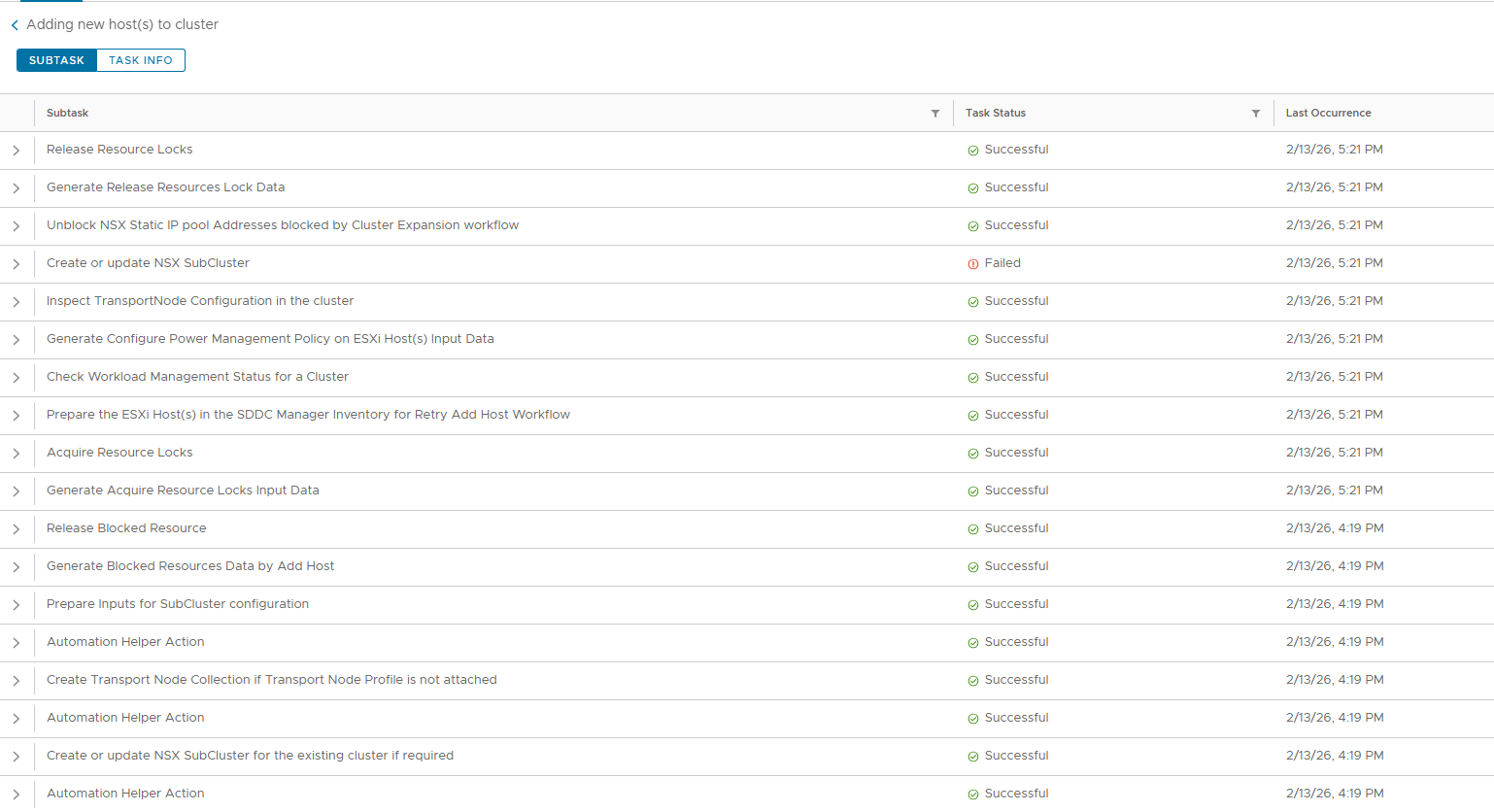
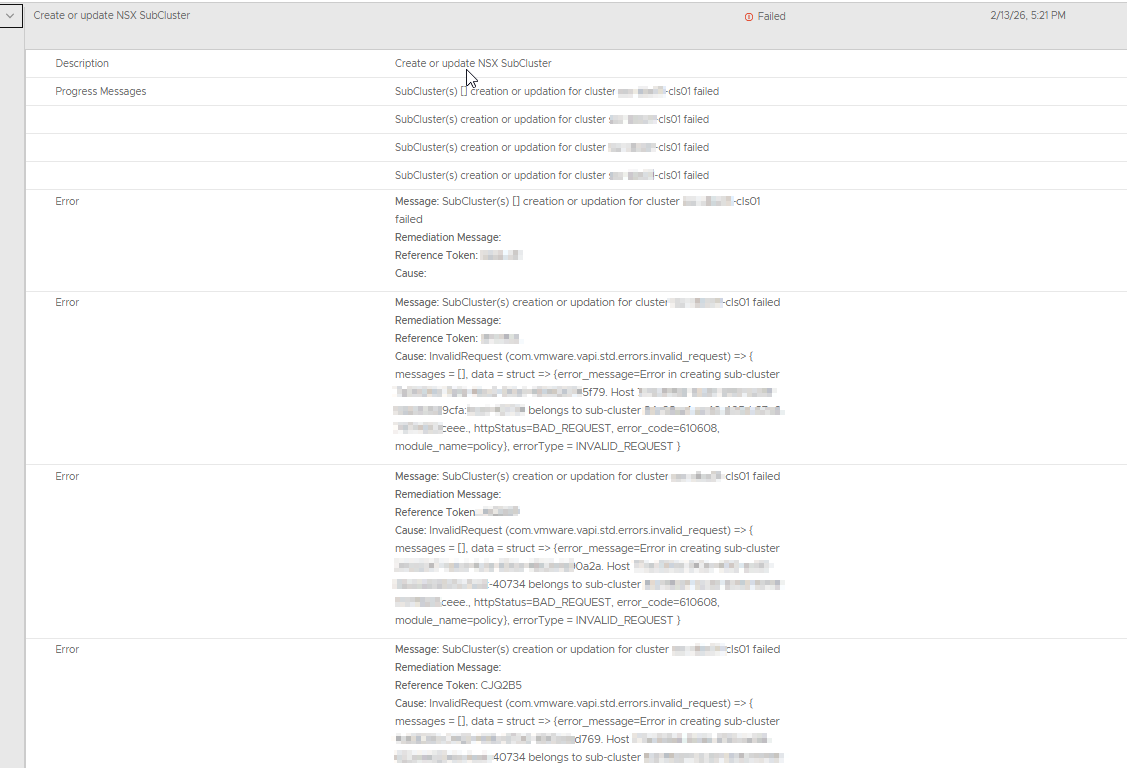
The JSON that we were feeding into the API looked like this, and this matches exactly what the 5.1 release had stated –
{

"clusterExpansionSpec": {

"forceHostAdditionInPresenceofDeadHosts": false,

"hostSpecs": [ {

"azName": "",

"hostName": "[FQDN of Host]",

"hostNetworkSpec": {

"networkProfileName": "",

"vmNics": [ {

"id": "vmnic0",

"moveToNvds": false,

"uplink": "uplink1",

"vdsName": "[redacted]-cls01-vds-01"

}, {

"id": "vmnic1",

"moveToNvds": false,

"uplink": "uplink2",

"vdsName": "[redacted]-cls01-vds-01"

}, {

"id": "vmnic2",

"moveToNvds": false,

"uplink": "uplink1",

"vdsName": "[redacted]-cls01-backup-vds-01"

}, {

"id": "vmnic3",

"moveToNvds": false,

"uplink": "uplink2",

"vdsName": "[redacted]-cls01-backup-vds-01"

} ]

},

"id": "[ID of UNASSIGNED_USABLE host]",

"ipAddress": "[Management IP of host]",

"licenseKey": "[vSphere license key]",

"password": "[Host's root password]",

"username": "root"

} ],

"interRackExpansion": false

}

}
The failures and rapid timeline prompted a support case with Broadcom. They confirmed this being a known issue, and fixed in VCF 5.1.1, but couldn’t provide guidance on the actual fix. The only reiterated what the known issue stated – networkProfileName with empty string will cause the task to fail. Great. We did some digging and I will show you two ways to acquire the information needed to move passed this issue.
Method 1 – APIs All the Way
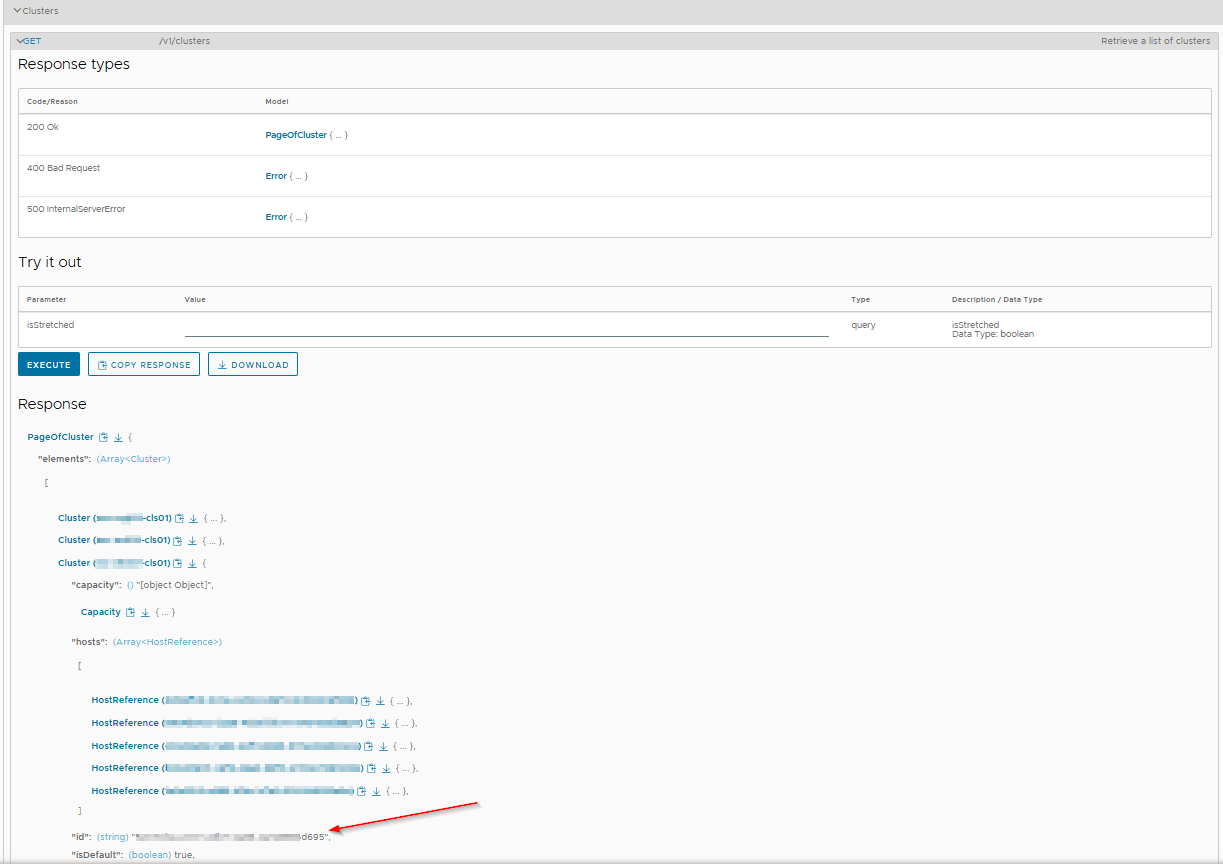
Using the API Explorer in the Development Center of the SDDC Manager (or whichever API platform utility you prefer), we first acquired the ID of the cluster in the VI domain that we would be working with by executing GET on the /v1/clusters API.
Next, we sent a POST to /v1/clusters/{ID of cluster from previous step}/network/queries with the request body being {"name": "VCENTER_NSXT_NETWORK_CONFIG"} since this is an NSX-T-enabled cluster.
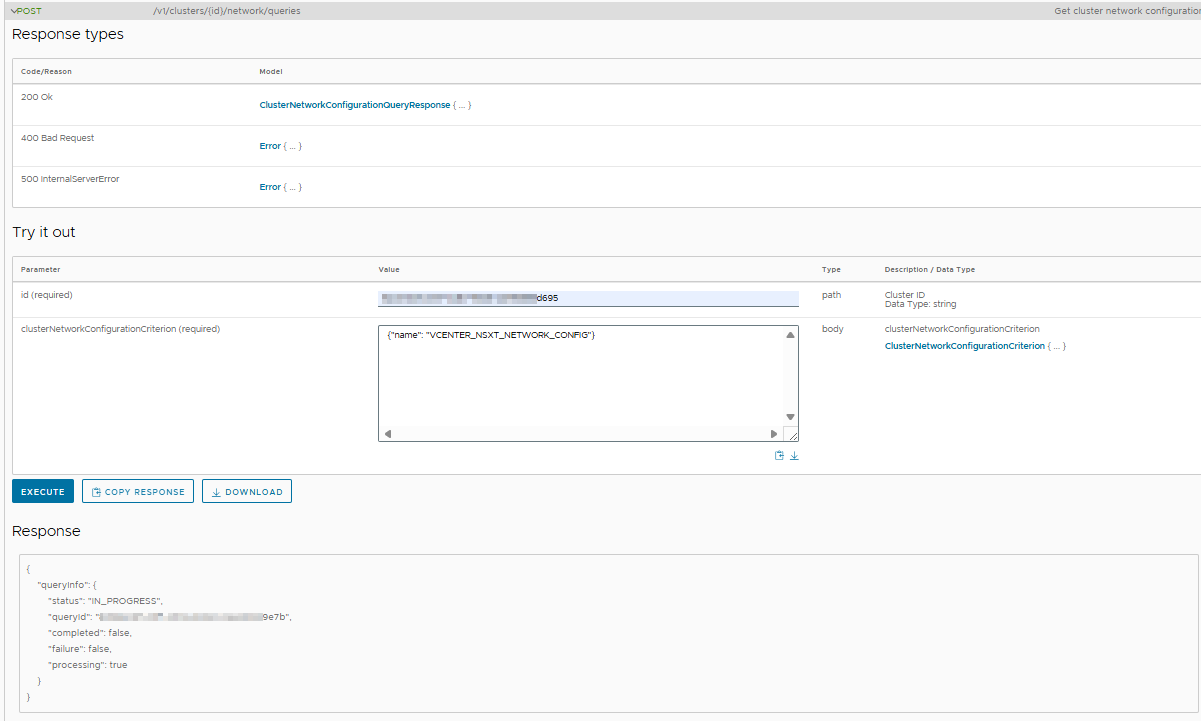
This returns a QueryID that we then used to locate the networkProfileName that this cluster is configured to use. We did this step by executing GET against /v1/clusters/{ID of cluster from first step}/network/queries/{query ID from previous step} like so –
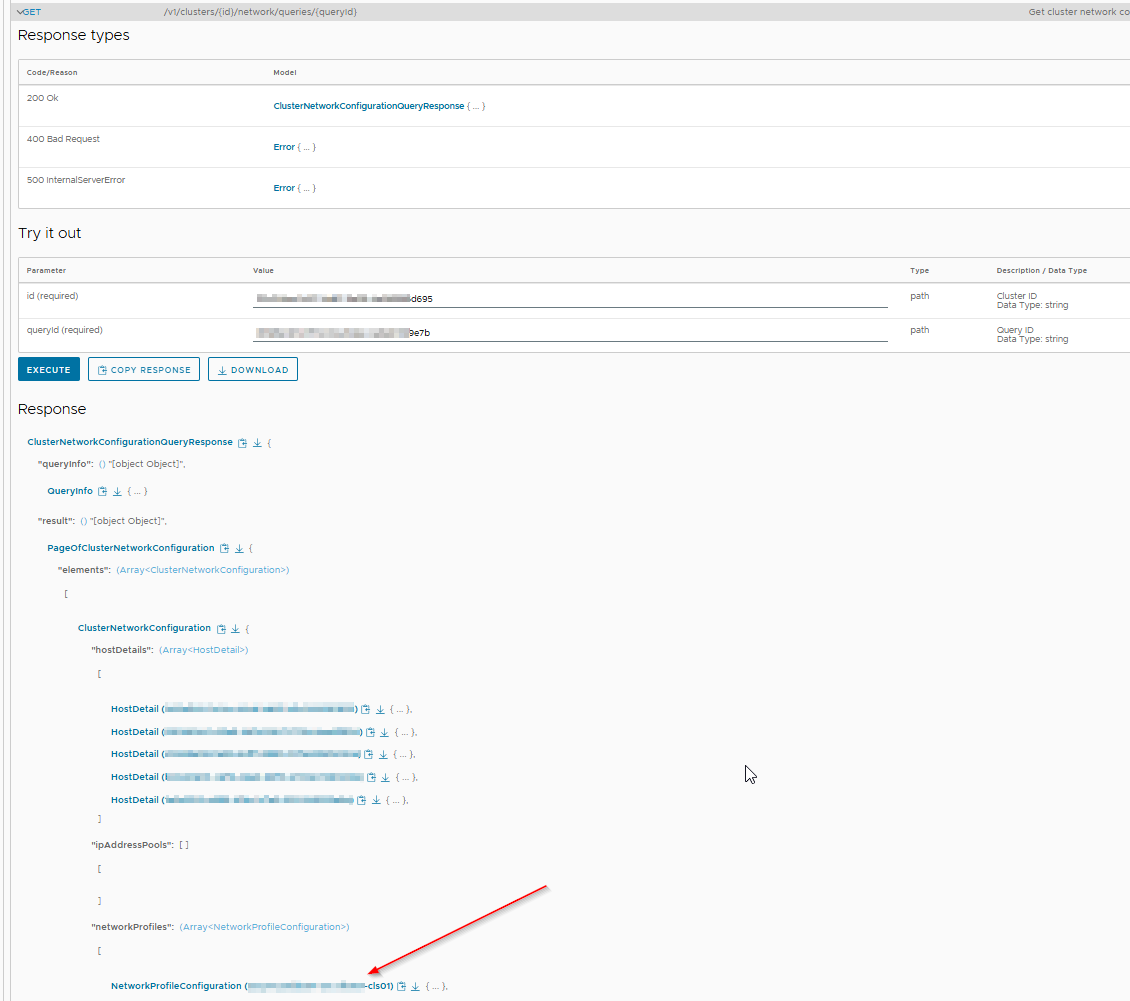
From here, we edit our JSON and re-submit by using PATCH/v1/clusters/{cluster ID from first step}.
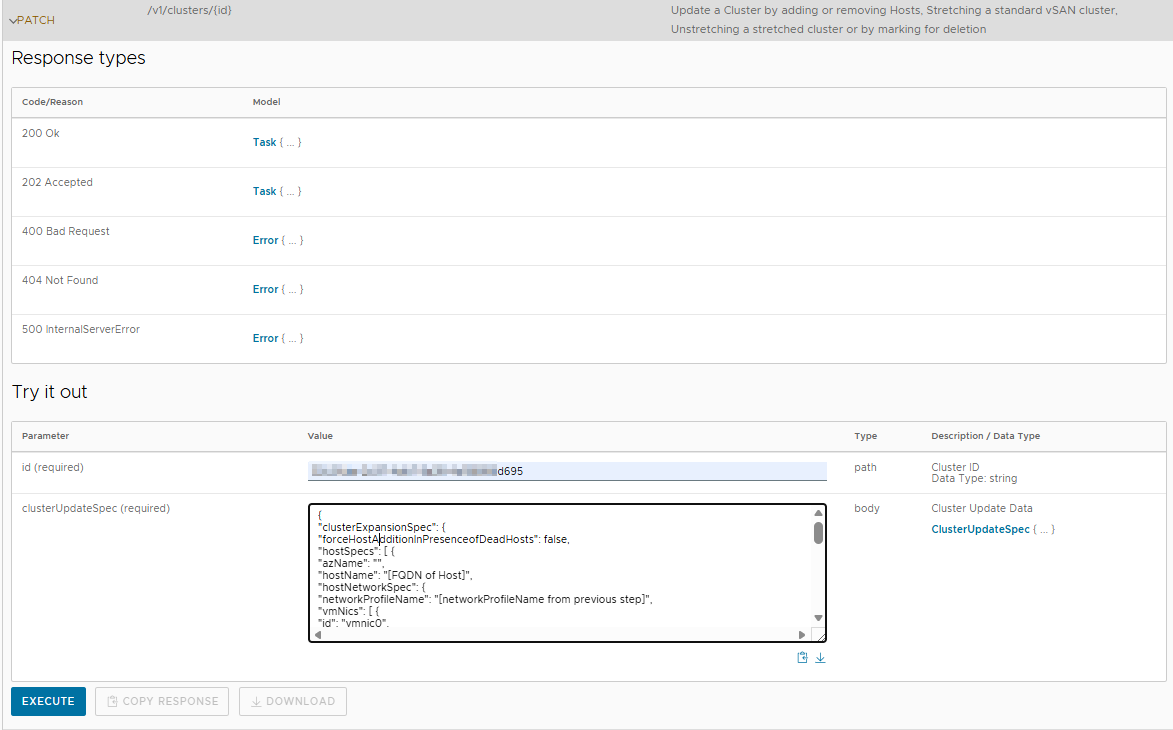
BOOM! Task submitted, and this time is completed successfully!

Method 2 – NSX and APIs
After the fact, we found a MUCH easier way to find the information if you’re just doing this for a single host. It will save a bunch of time. The only reason why we didn’t use this method from the start was because we were not fully familiar with this particular customer’s configuration.
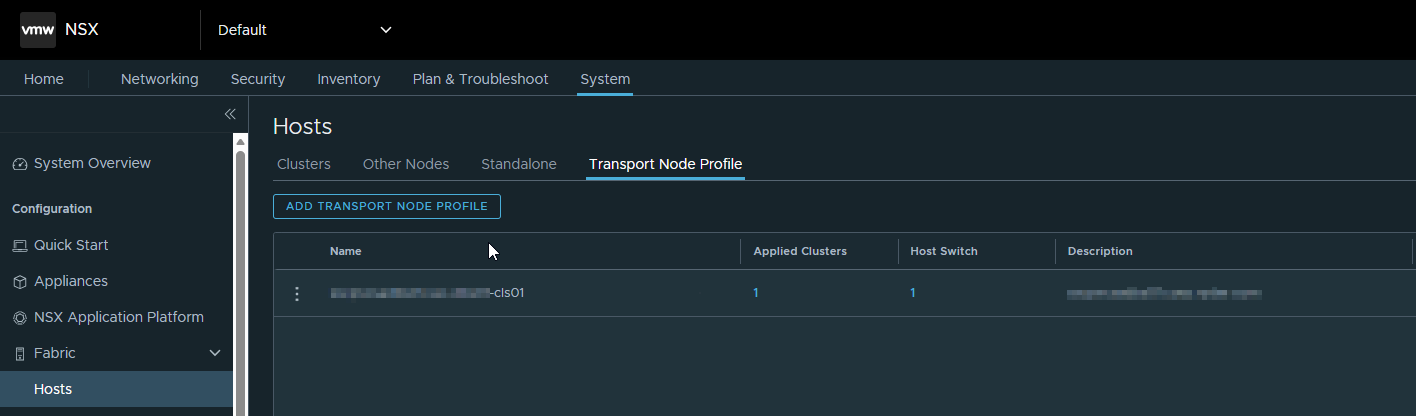
Start by logging into the proper NSX-T instance. Navigate yourself to SYSTEM > Fabric > Hosts > Transport Node Profile. If you only have one TNP, the name of it is what you need to plug back into you JSON. If you have more than one, make sure you choose the proper one to avoid improper configurations.
Conclusion
This isn’t the biggest issue in the world, and really needs from specific circumstances. Not to mention the known issue only affects base VCF 5.1 installations. However, since there was no official support documentation from Broadcom on this fix, we decided to type one up. Thanks for Arjun Gupta from Broadcom VMware Support who wanted to create a public KB article with the official fix. He gave me article ID 429456. Once it is officially published, we’ll update this article with a link to it. Until next time! Thanks for reading. If you enjoyed the post, make sure you check us out at dirmann.tech and follow us on LinkedIn, X, Instagram, and Facebook!

Paul Dirmann (vExpert PRO*, vExpert***, VCIX-DCV, VCAP-DCV Design, VCAP-DCV Deploy, VCP-DCV, VCA-DBT, C|EH, MCSA, MCTS, MCP, CIOS, Network+, A+) is the owner and current Lead Consultant at Dirmann Technology Consultants. A technology evangelist, Dirmann has held both leadership positions, as well as technical ones architecting and engineering solutions for multiple multi-million dollar enterprises. While knowledgeable in the majority of the facets involved in the information technology realm, Dirmann honed his expertise in VMware’s line of solutions with a primary focus in hyper-converged infrastructure (HCI) and software-defined data centers (SDDC), server infrastructure, and automation. Read more about Paul Dirmann here, or visit his LinkedIn profile.
Share this article on social media:


